


Edmunds - Shop Cars For Sale
4.01.92K Reviews
App Specs
- Version
- 11.46.103313
- Updated On
- License
- Free
- Downloads
- 1,000,000+
- Developer
- Edmunds.com
- Categories
- Auto & Vehicles
- Platform
- Android, iOS
Screenshots
 Analysis by AppCompare
I approach car-shopping apps with one practical question: do they help me make a better decision before I spend time visiting sellers? Edmunds - Shop Cars For Sale is built for that early research stage, bringing vehicle listings together with tools for comparing options and thinking through price. I find it most useful when I have a few possibilities in mind but still need to narrow them down, rather than when I expect an app to make the whole purchase effortless.
Readable enough for browsing, with plenty to take in
The first thing I notice is that the experience is organized around a familiar task: looking for a car and evaluating what I find. Search filters can help me move from a broad set of listings toward vehicles that fit my needs, while reviews, pricing information, and comparisons give the search more context. That mix makes the app feel more like a research desk than a simple classified feed.
There is a trade-off. A car search involves many details, and a feature-rich app can feel busy when I only want a quick answer. I would start with a few important filters—such as the type of vehicle and a realistic budget—then add narrower preferences only after seeing what is available. That keeps the results manageable and reduces the chance of filtering out a promising option too early.
Different ways to process a major decision
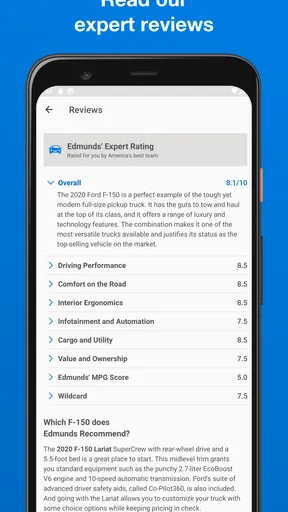
Car shopping can be demanding even before the test drive: people may be reading on a small screen, switching between listings, or trying to make sense of unfamiliar terms. I appreciate having expert reviews and side-by-side comparisons available because they give me more than a seller’s description to work with. The app’s value is not that it removes every hard decision; it is that it gives me several angles from which to examine one.
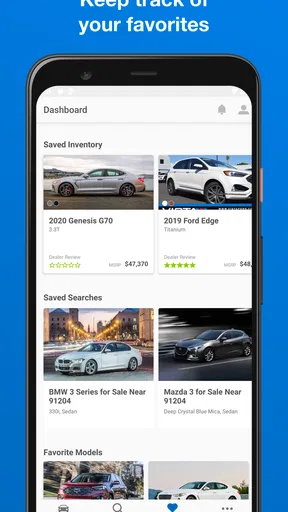
For anyone who finds dense screens tiring, I would treat a browsing session as a series of small decisions instead of trying to absorb every detail at once. Save the key questions for each candidate: does it fit my needs, does the asking price appear reasonable, and what do I still need to verify with the seller? That approach also helps when a friend or family member is involved in the choice and wants a clear explanation of why one car is on the shortlist.
Using Edmunds in the real world
I use this section to think through how Edmunds fits into the parts of car shopping that happen away from a desk: checking a shortlist between errands, preparing questions before a visit, and keeping research manageable when attention is limited. The key is to treat the app as a planning aid, then consider what still needs a direct conversation or an in-person check.
Useful before a visit, not a substitute for one
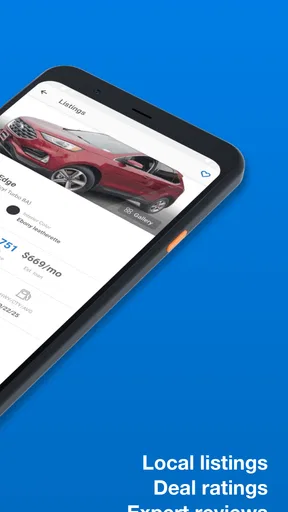
A realistic use case is planning a weekend of dealership visits. I can first search for vehicles that fit my rough requirements, compare a small number of models, and use pricing context to decide which listings deserve a closer look. Dealer reviews add another consideration: the seller’s reputation and the vehicle itself are separate parts of the decision, so I would not let a strong listing alone settle the matter.
Worth Reading Before You Choose

EA SPORTS FC Mobile 26 Is a Bigger Football Game, but It Takes Time

Flipboard Shows What News Apps Must Do Beyond the Feed

Switching to Android Auto Means Rethinking Your Driving Routine

Google Calendar Makes a Crowded Week Easier to Manage

Ludo King Makes the Most of the Minutes Between Plans

Baby Panda World Brings Quick Play to Modern Phones, but Its Game Library Feels Busy
That preparation can make an in-person visit more focused. I would write down what I want to ask, check that the listing still matches the vehicle I see, and arrange an independent inspection when appropriate. An app can help me arrive informed, but it cannot replace a test drive, a careful review of the paperwork, or confirming the car’s condition and history directly.
How it fits beside other car-shopping options
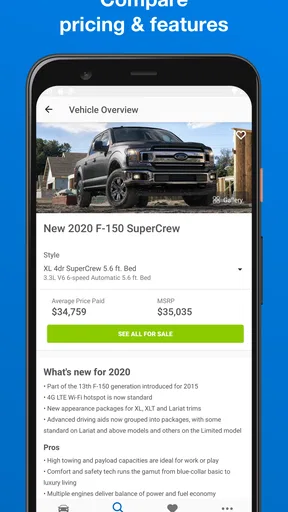
Compared with starting on a general classifieds marketplace, Edmunds puts more emphasis on vehicle research: expert reviews, comparison tools, and pricing guidance sit alongside the search. A manufacturer’s site can be a better choice when I want official details about a new model, while local listing platforms may be more convenient when my priority is seeing what nearby private sellers have posted. I would use those options together when a purchase is close, rather than expecting any single source to cover every part of the process.
The app is especially suited to shoppers who want to compare models before settling on a shortlist. It is less compelling for someone who already knows the exact car and seller they want, or who only needs a quick local listing without editorial context. If I am not ready to buy, it can still support research, but I would keep the search focused so browsing does not turn into an endless stream of possibilities.
Where access can still feel uneven
Edmunds.com develops this free Auto & Vehicles app, which is rated for Everyone and has a 4.0 average from around 6,700 ratings. More than a million installs suggest it has reached a broad audience, but popularity does not tell me whether its presentation will suit every person or situation. I would judge it by whether the search, listing details, and research tools are comfortable for the individual using it.
There are practical limits to keep in mind. Pages can occasionally load slowly, which is frustrating when I am comparing several candidates or trying to check information while out and about. The number of options and sections may also take some getting used to, particularly for someone who prefers a very simple interface. I would browse when I have a stable connection and enough time to read, rather than relying on a rushed session to answer every question.
For people with motor or sensory considerations, the most useful test is personal: can you comfortably navigate the filters, read the listing information, and return to a comparison without losing your place? I would try a short session before depending on the app for a time-sensitive decision. If screen interaction is difficult, a trusted companion can help review candidates, though the final vehicle checks still need to happen outside the app.
Who I would recommend it to
I would recommend Edmunds to someone beginning a new- or used-car search who wants research and shopping tools in the same place. Its combination of filters, pricing context, expert reviews, comparisons, and dealer feedback can make the early stages more deliberate. The app has been around since 2011, and version 11.45.103304 continues that focus on helping shoppers explore their options.
I would be more cautious about recommending it as the only tool for a buyer who needs a highly simplified experience, has unreliable access while traveling between sellers, or is ready to verify a specific car immediately. In those cases, a direct call to the seller, a local marketplace, or in-person help may be more useful. The app is free, so trying it as one part of a broader search is a low-commitment way to see whether its layout works for you.
First Impressions
When I first fired up the Edmunds app, I was immediately greeted by a clean, user-friendly interface. It's like walking into a well-organized dealership where everything is in its place. Navigating through the app is a breeze, thanks to its intuitive design. Whether you're a tech whiz or someone who's more comfortable with old-school methods, you'll find this app straightforward and easy to use.
Features Galore
What really sets Edmunds apart is its treasure trove of features. Let me break down some of my favorites:
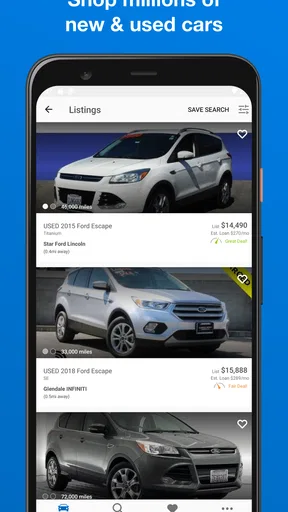
- Comprehensive Search Filters: You can filter your search by make, model, price range, and even down to the nitty-gritty details like color and engine type. This is perfect for those who know exactly what they want.
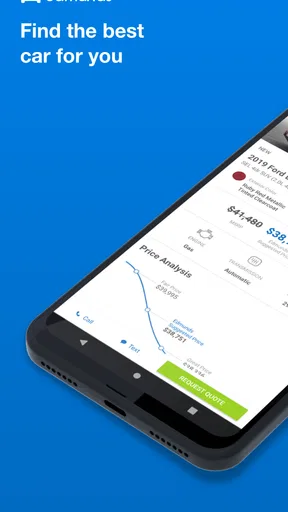
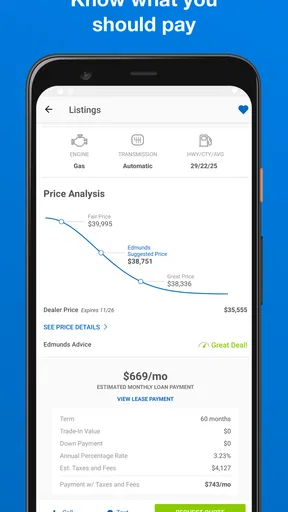
- Price Checker: The app provides a nifty price checker tool that helps you gauge if a listed price is fair. It’s like having an expert negotiator whispering in your ear.
- Expert Reviews and Ratings: Before making a big purchase, it’s essential to know what you’re getting into. Edmunds offers expert reviews and ratings that are both detailed and insightful.
- Car Comparison: Stuck between a couple of choices? The app allows you to compare different models side by side. It’s a real game-changer for indecisive shoppers.
- Dealer Reviews: Buying a car isn’t just about the vehicle itself; the buying experience matters too. Edmunds features dealer reviews so you can choose where to buy with confidence.
Personal Experience
Using the app felt like having a personal car consultant at my fingertips. I was particularly impressed by the seamless integration of data and user feedback. The app not only helped me find potential vehicles but also educated me on market trends and pricing strategies.
One feature I found incredibly helpful was the True Market Value pricing. It gave me a realistic idea of what others are paying for the same vehicle, which is invaluable during negotiations. It’s like having a secret weapon!
Room for Improvement
No app is perfect, right? While Edmunds does a fantastic job overall, I did notice a couple of areas that could use a little polish. Occasionally, the loading times for certain pages were a bit sluggish, especially when browsing through numerous listings. Also, while the app is rich in features, a bit of simplification in some sections could enhance user experience for those less tech-savvy.
Final Thoughts
All in all, Edmunds - Shop Cars For Sale is a powerhouse app for anyone in the market for a new or used car. It’s a one-stop-shop that combines convenience, information, and user-friendly features to make car shopping not only manageable but enjoyable.
So, if you’re ready to dive into the world of car buying, or even if you're just daydreaming about that future ride, give Edmunds a spin. You might just find that perfect set of wheels with a lot less stress and a lot more confidence. Happy car hunting!
Pros
- Intuitive interface for easy navigation.
- Comprehensive vehicle comparison tools.
- Detailed dealership reviews available.
- Includes price analysis for better deals.
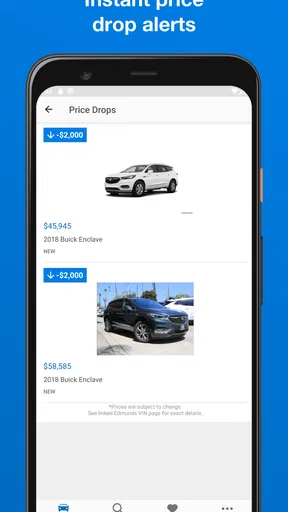
- Customizable alerts for price drops.
Cons
- Limited to U.S. market only.
- Some listings lack detailed photos.
- Occasional delays in data updates.
- User account required for full access.
- No direct purchase option through app.
FAQs for Edmunds - Shop Cars For Sale
What features does the Edmunds app offer for car buyers?
The Edmunds app provides a comprehensive platform for car buyers, featuring tools to compare prices, read expert and user reviews, and access detailed vehicle specifications. Additionally, it offers a price calculator, trade-in appraisals, and financing options, making it a valuable resource for making informed purchasing decisions.
Is the Edmunds app free to use, or are there any in-app purchases?
The Edmunds app is free to download and use, providing access to a vast range of tools and resources. However, some advanced features or detailed reports may require in-app purchases. Always check the app's description and reviews for any updates on pricing before downloading.
How reliable is the information provided by the Edmunds app?
Edmunds is known for its credible and well-researched automotive data. The app offers expert reviews, dealership ratings, and real-time inventory listings, ensuring users receive accurate and up-to-date information. User reviews also add another layer of trust, helping potential buyers make informed decisions.
Can I use the Edmunds app to sell my car?
Yes, the Edmunds app offers features for both buying and selling cars. Sellers can list their vehicles, get an estimated trade-in value, and connect with interested buyers. The app streamlines the selling process, making it easier to reach a broader audience and get competitive offers.
Does the Edmunds app provide financing options for purchasing a car?
The Edmunds app includes a financing feature that helps users explore various financing options. Users can calculate estimated monthly payments, compare loan offers, and even get pre-approved for loans. This feature simplifies the financial planning aspect of car buying, ensuring users have a clear understanding of potential costs.


